📑 The Research 📑
This project required a ridiculous amount of planning and research. I needed to access product specifications, reviews, and forum discussions from my specific timeframe of 2004-2009. The problem here is that the Internet of that era is largely dead and gone. A 2024 Pew Research study revealed that nearly 40% of webpages that existed in 2013 are no longer accessible, so we can assume that percentage is even larger for webpages from before 2013.
Resources
Luckily, we still have the power of the Wayback Machine to revive dead links, but sometimes there's just nothing to do but accept the death and move on to a different source. There were a few websites I used for this project that surprisingly had massive archives of their reviews, articles, or product listings dating back to the 2000s:
- CNET Archive - CNET wins the best backend scheme here with articles all the way back to 1995.
- Tom's Hardware - Articles going all the way back to 1999!
- Newegg - They have product listing going back to the late '90s, complete with their images, which is insane.
- TechSpot News Archive - Another place to find product reviews dating back to 2002.
- The Retro Web - An excellent resource I wish that I'd had in the planning phase. I didn't actually find this until I finished building the PC and was looking for drivers. nonetheless, but it is an excellent resource for finding !
Choosing a Processor
Traditionally, planning a computer build starts with choosing a processor (CPU) and motherboard. This isn't a standardized choice, so you have to make sure your motherboard socket type supports the CPU that you pick. Despite a lot of daydreaming over PC part catalogs in my lifetime, I couldn't quite recall the standards of computing from when I was a 10 year old. So, before I could start looking for parts, I needed to better understand the platforms of the era.
In the mid-2000s, you had two choices: Intel or AMD. Intel was (and still is) the market behemoth whose processors could be found in any corporate office in America. Their CPUs were largely reserved for "business-oriented" computing, confined to the desks of white collar jockeys and suits sat in front of Microsoft Excel all day. AMD on the other hand, reigned as the go-to processor for computer gaming throughout the 2000s.
It should be noted that this era of gaming coincided with the so-called CPU Wars, where AMD started to become a viable threat to Intel's monopolistic market share. Lawsuits flew, marketing adapted, and Intel realized they had to get skin in the game of the growing PC gaming market. There wasn't a question about each brand's purpose at the time.
Through a combination of marketing and manufacturing changes on Intel's part, mid-2000s gamers started taking Intel more seriously as a "gaming capable" platform. And the numbers didn't lie: in 2006, the Intel Core 2 Duo blew all the AMD chips out of the water in overall performance.
Either way, I know that I'd likely have been laughed out of a LAN party if my rig had an Intel processor in 2007. For this reason alone, I decided to go the AMD route. I used Wikipedia's list of AMD processors to narrow down my choices, specifically by the browsing entries under their K8 and K10 core architectures.
After some Wikipedia digging, I settled on AMD's Athlon 64, which was one of the first 64-bit consumer processors and was backwards compatible with 32-bit instructions. I used the list of Athlon 64 processors and took note of the most performant CPUs that released around 2006:
- Athlon 64 X2 4200+, 4400+, 4600+, 4800+, or 5000+
- Athlon 64 FX
Choosing a Motherboard
Now that I knew what processor line I wanted to use for my build, I had to start looking for a motherboard. From my previous notes, I knew that I'd need one that had a 939 or 940 socket. I started searching for bundles on eBay with those two socket types. I had it all worked out.. until I was presented with a listing of immaculate proportions:
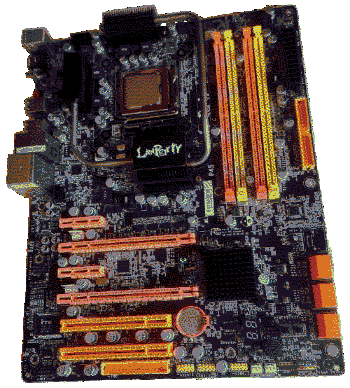
This is the DFI Lanparty P45-T2RS.
I immediately paid $100 for this UV-reactive, gamers-only motherboard from a company I'd never heard of. It came bundled with a processor, and guess what? It was an Intel. I guess I'm getting roasted at the LAN party after all.